Tuesday, September 8, 2015
Updated Transmission
A little birdie in comments tells me there's a new version of Transmission for Tiger that I previously wrote about. This new version is 2.84 and is available at this link new updated link, so try it out. I did and it's much nicer!

Thursday, August 13, 2015
Debian Kernel With Sound Fix
(UPDATE: The original version of this post had typos in the symlinks below. They have been corrected.)
Following up on my last post where I mentioned compiling a custom kernel to test sound patches, I can report the patches worked and those of you who have been suffering from that nasty soundcard detection failure will have restored sound in, I believe, the 4.2 kernel. However, if you don't want to wait that long, I'm making available the patched Jessie kernel I compiled on my Sawtooth (download link at bottom).
Actually, the first kernel I compiled was on my G3 iBook, but I compiled it without Altivec instructions, so that would be kind of useless to G4 owners. So I compiled another one on the Sawtooth (I didn't want to risk melting my iBook again), and it works fine on all three systems I've tried it on (G3 iBook, G4 Sawtooth, and G4 Powerbook). It's compiled with all the stock options; the only modifications are the two patches, this one applied on top of this one, that fix the sound bug.
So after you download it, open a terminal and use the
Then install the kernel with:
Then to set it as your default kernel, create these two symlinks:
Then edit /etc/yaboot.conf, adding this kernel entry on top of the others:
Now using this very unofficial kernel brings up thorny security issues: how can you trust it, how do you know it doesn't have malicious code, etc. However, in the years I've written this blog, I think I've established that
a) I'm reasonably trustworthy.
b) I totally lack the skills to pull something like that off.
So install with no worries :)
Here's the download and sha256 fingerprint:
http://www.mediafire.com/download/cj8h2h4dybg2otm/linux-image-3.16.7-ckt11-soundfix_1.0_powerpc.deb
sha256: f489a9d2c617fa803bbe44c7913a4540b1705ab3e6da6b149559bddcb3b508ff
Following up on my last post where I mentioned compiling a custom kernel to test sound patches, I can report the patches worked and those of you who have been suffering from that nasty soundcard detection failure will have restored sound in, I believe, the 4.2 kernel. However, if you don't want to wait that long, I'm making available the patched Jessie kernel I compiled on my Sawtooth (download link at bottom).
Actually, the first kernel I compiled was on my G3 iBook, but I compiled it without Altivec instructions, so that would be kind of useless to G4 owners. So I compiled another one on the Sawtooth (I didn't want to risk melting my iBook again), and it works fine on all three systems I've tried it on (G3 iBook, G4 Sawtooth, and G4 Powerbook). It's compiled with all the stock options; the only modifications are the two patches, this one applied on top of this one, that fix the sound bug.
So after you download it, open a terminal and use the
cd command to change to your downloads directory:cd ~/DownloadsThen install the kernel with:
sudo dpkg -i linux-image-3.16.7-ckt11-soundfix_1.0_powerpc.debThen to set it as your default kernel, create these two symlinks:
sudo ln -s /boot/initrd.img-linux-image-3.16.7-ckt11-soundfix /boot/initrd.img.soundfix

sudo ln -s /boot/initrd.img-3.16.7-ckt11-soundfix /boot/initrd.img.soundfix
sudo ln -s /boot/vmlinux-linux-image-3.16.7-ckt11-soundfix /boot/vmlinux.soundfix
sudo ln -s /boot/vmlinux-3.16.7-ckt11-soundfix /boot/vmlinux.soundfixThen edit /etc/yaboot.conf, adding this kernel entry on top of the others:
image=/boot/vmlinux.soundfix
     label=soundfix
     read-only
initrd=/boot/initrd.img.soundfixsudo ybin -v to update the configuration.Now using this very unofficial kernel brings up thorny security issues: how can you trust it, how do you know it doesn't have malicious code, etc. However, in the years I've written this blog, I think I've established that
a) I'm reasonably trustworthy.
b) I totally lack the skills to pull something like that off.
So install with no worries :)
Here's the download and sha256 fingerprint:
http://www.mediafire.com/download/cj8h2h4dybg2otm/linux-image-3.16.7-ckt11-soundfix_1.0_powerpc.deb
sha256: f489a9d2c617fa803bbe44c7913a4540b1705ab3e6da6b149559bddcb3b508ff
Thursday, July 16, 2015
Compile a Custom Kernel on Debian
This post is mostly a note to myself in case I ever have to do this again, but if you can make use of it, please feel free!
So you'd like to compile your own kernel in Debian. There are at least a few valid reasons why. First, the reason I did it, is to test kernel patches. Second, you may want to configure your kernel to work around driver bugs. For example, see this Debian-PPC-mailing-list thread about compiling your kernel to get the Nouveau driver working on G5 Power Macs (long thread, but very interesting information). And third, you may want to test newer kernels from upstream to get a head start on bug squashing. In any event, here are the exact steps I took to compile my own kernel in Debian Linux:
So there you have it! It should automatically make your new kernel the default, but if it doesn't you can add a new kernel section to /etc/yaboot.conf, placing it at the top above the "Linux" and "old" sections. Conclude of course by running "sudo ybin -v".
The actual compiling took eight hours on my G3 iBook, and not wanting to burn out my iBook compiling a kernel, I set up a desk fan to blow across the keyboard to keep temperatures sane. Here's a time saver, though: If you want to apply subsequent patches, you can go straight to the "fakeroot make-kpkg" step and this will only recompile the modules you're patching rather than the whole kernel. So that's nice.
Finally, if you want to test new development kernels, obviously you'd download the source from upstream rather than Debian's repository.
Debian kernel compiling reference link (h/t rican-linux).
So you'd like to compile your own kernel in Debian. There are at least a few valid reasons why. First, the reason I did it, is to test kernel patches. Second, you may want to configure your kernel to work around driver bugs. For example, see this Debian-PPC-mailing-list thread about compiling your kernel to get the Nouveau driver working on G5 Power Macs (long thread, but very interesting information). And third, you may want to test newer kernels from upstream to get a head start on bug squashing. In any event, here are the exact steps I took to compile my own kernel in Debian Linux:
sudo aptitude install fakeroot kernel-package libncurses5-dev #installs the development packages (about a gigabyte).


sudo aptitude install linux-source-3.16 #installs the source into /usr/src.


cd ~/Development #change directory into the "Development" folder in my home folder.


tar -Jxf /usr/src/linux-source-3.16.tar.xz #unpacks the source into current directory.


cd ~/Development/linux-source-3.16 #change to linux-source-3.16 directory; if you're applying patches, this is the stage to do it.


make menuconfig #configure your kernel options.


make-kpkg clean #clean stuff?


fakeroot make-kpkg --initrd --revision=1.0 --append-to-version=-custom1 kernel_image #compiles the kernel; the "--revision" and "--append-to-version" options may be redundant, but I just did them both; notice the "-custom1" begins with a leading "-".


sudo dpkg -i ../linux-image-3.16.7-ckt9-custom1_1.0_powerpc.deb #installs the kernel.
So there you have it! It should automatically make your new kernel the default, but if it doesn't you can add a new kernel section to /etc/yaboot.conf, placing it at the top above the "Linux" and "old" sections. Conclude of course by running "sudo ybin -v".
The actual compiling took eight hours on my G3 iBook, and not wanting to burn out my iBook compiling a kernel, I set up a desk fan to blow across the keyboard to keep temperatures sane. Here's a time saver, though: If you want to apply subsequent patches, you can go straight to the "fakeroot make-kpkg" step and this will only recompile the modules you're patching rather than the whole kernel. So that's nice.
Finally, if you want to test new development kernels, obviously you'd download the source from upstream rather than Debian's repository.
Debian kernel compiling reference link (h/t rican-linux).
Thursday, July 9, 2015

Sunday, June 28, 2015
MintPPC and iLinux Back Up
In case you missed it, the MintPPC and iLinux sites were hacked. Also, in case you missed it, they're now back up!
The sites were compromised for several weeks because their owner, linuxopjemac, didn't own the server. As explained in a forum thread, he finally gained contact with the server administrator to regain access and was able to repair the damage. This is great news as there were a lot of useful files on those sites (xorg.conf, anyone?) and the MintPPC forums have always been one of the best resources available.
Also on the topic of service disruptions, Sevan's pkgsrc PowerPC server at http://sevan.mit.edu/ is currently down for repairs. In the meantime, you can use http://pkgsrc.geeklan.co.uk/
The sites were compromised for several weeks because their owner, linuxopjemac, didn't own the server. As explained in a forum thread, he finally gained contact with the server administrator to regain access and was able to repair the damage. This is great news as there were a lot of useful files on those sites (xorg.conf, anyone?) and the MintPPC forums have always been one of the best resources available.
Also on the topic of service disruptions, Sevan's pkgsrc PowerPC server at http://sevan.mit.edu/ is currently down for repairs. In the meantime, you can use http://pkgsrc.geeklan.co.uk/
Monday, June 8, 2015
Three Questions About El Capitan
1. Is it faster than Yosemite?
2. Is it still spyware like Yosemite?
3. Do I have to worry about my parachute failing to unfurl?
2. Is it still spyware like Yosemite?
3. Do I have to worry about my parachute failing to unfurl?
Friday, June 5, 2015
iOS 9 is not OS 9
If you plan on scanning the tech headlines in the next several months, make sure you don't misread iOS 9 as "OS 9." You will be bitterly disappointed. You will be especially aghast at reports of new features such as multi-user support. In 2015.
For OS's that support PowerPC, we'll have to make due with what we got. Handily, TCH put a list together compiling every OS that ran on PowerPC through the present-day, so pay a visit to OS for PPC and go explore.
For OS's that support PowerPC, we'll have to make due with what we got. Handily, TCH put a list together compiling every OS that ran on PowerPC through the present-day, so pay a visit to OS for PPC and go explore.
Wednesday, May 6, 2015
The End of the Road for MacTubes, et al?
MacTubes stopped working today. This is thanks to Google "upgrading" Youtube's programming API to version 3, which breaks all third party apps that relied on API v2. In addition to MacTubes, YouView and SMTube are also knocked out, and it will take some reworking of their code to get things working again. And even if they are under active development, to use API v3 they'll have to abide by new terms of service which prohibits downloading of videos.
So with MacTubes' last update being two-plus years ago, this would appear to be the end for this venerable app and saver of countless old Macs. The thing I'll miss most is its local playlist feature, where you could save playlists to your hard drive and have them display with videos' thumbnails in MacTube's browser. I haven't seen this feature on any other Youtube app.
You may notice, though, one Youtube downloader conspicuously absent from the list of broken apps, and that's youtube-dl. It's still going strong as ever, and fortunately for us Mac users, Adam Albrec's GUI frontend for youtube-dl, PPC Media Center, has also just been updated to version 5.0. The new version can stream or save to disk as always, but now also has an MP3 converter so you can save videos as MP3s.
On the Linux side, I'm still using youtube-dl in combination with my trusty script:
This requires you have mpv and xsel installed in addition to youtube-dl. I've also been meaning to look at youtube-dlG, a graphical frontend for youtube-dl similar to PPC Media Center, only for Linux.
And if you can believe it, Youtube on Mac OS 9 isn't dead yet as YTBfC has been updated to work in the brave new world.
In a couple of other software updates to note, Adam Albrec's PowerPC Security Mode has been updated to address some Finder lock-up problems, and leopard-webkit recently released a slew of important security fixes.
PowerPC still has a pulse.
So with MacTubes' last update being two-plus years ago, this would appear to be the end for this venerable app and saver of countless old Macs. The thing I'll miss most is its local playlist feature, where you could save playlists to your hard drive and have them display with videos' thumbnails in MacTube's browser. I haven't seen this feature on any other Youtube app.
You may notice, though, one Youtube downloader conspicuously absent from the list of broken apps, and that's youtube-dl. It's still going strong as ever, and fortunately for us Mac users, Adam Albrec's GUI frontend for youtube-dl, PPC Media Center, has also just been updated to version 5.0. The new version can stream or save to disk as always, but now also has an MP3 converter so you can save videos as MP3s.
On the Linux side, I'm still using youtube-dl in combination with my trusty script:
#!/bin/bash

mpv --framedrop=vo --cache 8192 --cache-initial 410 $(youtube-dl -gf 18 $(xsel --clipboard))
This requires you have mpv and xsel installed in addition to youtube-dl. I've also been meaning to look at youtube-dlG, a graphical frontend for youtube-dl similar to PPC Media Center, only for Linux.
And if you can believe it, Youtube on Mac OS 9 isn't dead yet as YTBfC has been updated to work in the brave new world.
In a couple of other software updates to note, Adam Albrec's PowerPC Security Mode has been updated to address some Finder lock-up problems, and leopard-webkit recently released a slew of important security fixes.
PowerPC still has a pulse.
Sunday, April 26, 2015
Debian Jessie Turns Stable
I know it's hard to hear me over the din of the roof-raising Debian release parties, but I'll try.
Debian Jessie turned stable today, so what does it mean for PowerPC users? It's been a two-year, sometimes harrowing ride for Jessie, but now that it's turned Stable, I think it's... okay. On Mac models where it works well, like my aluminum Powerbook, it's great and a nice improvement over Wheezy. Unfortunately some models experience serious bugs out of the box, but the good news is there are workarounds. On that subject, I've just updated my Debian install guide taken from my own experiences installing on a few different Macs.
Yes, there's a major sound bug affecting my G3 iBook, and according to reports, several other models, but there's a workaround. There are some severe graphics bugs, but there are workarounds. I'm hoping this is a time of transition for PowerPC Linux, where the right bug reports and testing will lead to a better-out-of-the-box experience around the corner.
I've seen people write that we shouldn't bother filing bug reports on KMS because KMS on PowerPC will never be fixed. I'm going to test that theory. I have a black screen of death issue with my iBook that requires disabling KMS, so I'll file a bug report on that and see where it goes (UPDATE: here's the bug report). On the sound bug front, a developer doing I2C work just popped in on the Debian PowerPC mailing list and offered to work on it, with the right assistance. If there's anyone with an afflicted machine who can compile custom kernels, I'm sure he'd appreciate your help. If it's gonna be me, theeeeeeen I guess I better learn how to compile custom kernels (UPDATE: I just compiled a custom kernel and am helping to debug kernel patches. Weeeeeeeeeeeeeeeeeee!).
Also, a shoutout should go to Ubuntu MATE's PPC maintainer for making patched Mesa binaries available that also work on Jessie.
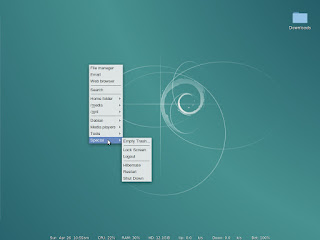
Here are a couple of screenshots of my iBook's Openbox desktop (my Powerbook ain't all purtied up yet):

Debian Jessie turned stable today, so what does it mean for PowerPC users? It's been a two-year, sometimes harrowing ride for Jessie, but now that it's turned Stable, I think it's... okay. On Mac models where it works well, like my aluminum Powerbook, it's great and a nice improvement over Wheezy. Unfortunately some models experience serious bugs out of the box, but the good news is there are workarounds. On that subject, I've just updated my Debian install guide taken from my own experiences installing on a few different Macs.
Yes, there's a major sound bug affecting my G3 iBook, and according to reports, several other models, but there's a workaround. There are some severe graphics bugs, but there are workarounds. I'm hoping this is a time of transition for PowerPC Linux, where the right bug reports and testing will lead to a better-out-of-the-box experience around the corner.
I've seen people write that we shouldn't bother filing bug reports on KMS because KMS on PowerPC will never be fixed. I'm going to test that theory. I have a black screen of death issue with my iBook that requires disabling KMS, so I'll file a bug report on that and see where it goes (UPDATE: here's the bug report). On the sound bug front, a developer doing I2C work just popped in on the Debian PowerPC mailing list and offered to work on it, with the right assistance. If there's anyone with an afflicted machine who can compile custom kernels, I'm sure he'd appreciate your help. If it's gonna be me, theeeeeeen I guess I better learn how to compile custom kernels (UPDATE: I just compiled a custom kernel and am helping to debug kernel patches. Weeeeeeeeeeeeeeeeeee!).
Also, a shoutout should go to Ubuntu MATE's PPC maintainer for making patched Mesa binaries available that also work on Jessie.
Here are a couple of screenshots of my iBook's Openbox desktop (my Powerbook ain't all purtied up yet):


Subscribe to:
Posts (Atom)

